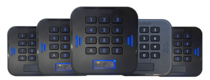
 LabKey Mini
 LabKey Glass
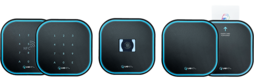 LabKey Next
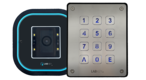 LabKey Extreme
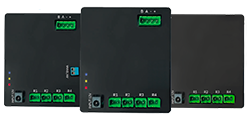 Wi-Fi & bluetooth connection
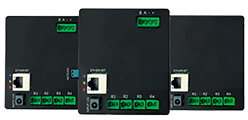 Wi-Fi / LAN Connection
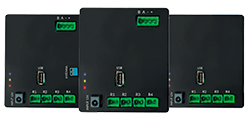 Wi-Fi / LTE Connection
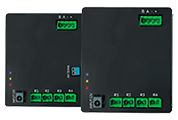 Local Network Connection
 KIT LABKEY ACCESS PRO 8
 For Bed & Breakfast
 Access Control for hotel
 Access control for GYM
 For Companies
 For Public Administration
 Access with payment solutions
 Some installations
 Manage Software
 Additional cloud feature
 App for remote control
 API and integrations


Public registration and booking link: users who sign up on their own
Public registration and booking link
Share a registration and booking link: your users register or book on their own and receive access to the authorised access points, with no forms to enter by hand.
You decide fields, permissions and enabling mode from the LabKey Manage Online panel.
How the registration link works
A single public page that collects data, assigns permissions and enables access: registrations become automatic and you keep control from the panel.
🔗 Share
You publish the link on your website, in an email or with a QR code.
📝 Fill in
The user enters their details and, if required, books.
💳 Pay
They pay online with Stripe once the form is complete.
Optional✅ Enable
Automatic enabling or after an operator’s check.
📲 Enter
They receive the access code by email or SMS.
What you customise from the panel
From the LabKey Manage Online panel you configure the public page in a few minutes.
Fields
The data to request, through the custom user profile.
Logo
Your logo at the top left of the page.
Title
Title and subtitle of the registration page.
Footer section
The footer section, with your own contact details added.
Permissions
The authorised access points, set up with access templates.
Automatic or manual enabling
You choose how much control to keep over each new registration.
⚡ Automatic enabling
At the end of registration the user is enabled according to the configured rules and permissions. Ideal for large volumes.
🧑💼 Manual enabling
The user stays disabled until an operator or administrator checks the data and activates them. Ideal when a check is needed.
Choose your solution
Start from the standard solution and add only what you need.
Registration link
The public page for registering or booking independently.
- Public registration activation
- Access permission templates
- Custom user profile fields
- Automatic or manual enabling
With online payment
A payment step at the end of registration.
- Everything in the standard solution
- Payment built into the process
- Stripe profile configurable from the panel
- Can be combined with automatic or manual enabling
Custom domain
An address with your organisation’s name.
- Dedicated third-level domain
- Hosted and managed by LabKey
- Can be combined with both solutions
Dedicated design and logic
A page designed around your needs.
- Preliminary functional analysis
- Fully customised design
- Dedicated flows, rules and integrations
Maintenance of the features is included in the annual hosting fee of the LabKey Manage Online panel. Stripe fees and any SMS service are excluded.
Try the registration link
Click the buttons and simulate the steps of the process, just as one of your users would.
▶️ Open the interactive demoWhere to use it
Wherever people need to sign up or book before entering.
Gyms
New members who register online.
Events
Attendees who book their entry.
Sports courts
Bookings with online payment.
Coworking
New members activated independently.
Municipalities
Citizens who sign up for services.
Schools and courses
Enrolment in courses and workshops.
Recycling centres
Users registered before dropping off waste.
Tailor-made
Have a different need? Let’s design the flow together.
Frequently asked questions about the registration link
What is the LabKey public registration link?
It is a web page with an address to share: users open it, enter their details, register or book on their own and, depending on the configuration, are enabled to use the authorised access points.
Is the user enabled immediately?
You choose. With automatic enabling, the user is active at the end of registration, according to the rules and permissions you have set. With manual enabling, they stay disabled until an operator or administrator checks and activates them.
Can I request a payment during registration?
Yes, with the online payment solution: once the form is complete, the user pays through Stripe. The Stripe profile is configured directly from the LabKey Manage Online panel.
How does the user receive the access code?
Once enabled, the system can send the access code by email or by SMS, depending on the chosen configuration.
Can I use an address with my organisation’s name?
Yes, with the custom domain: a dedicated third-level domain, hosted and managed by LabKey, which can be combined with both the standard solution and the online payment solution.
How much does it cost?
The price depends on the solution and the options chosen. Contact us or book a free, no-obligation call: we will prepare a tailored quote for you.
Want to activate the registration link?
Tell us how you currently manage sign-ups and bookings: we will recommend the right solution and send you a quote.
📅 Book a free, no-obligation call ▶️ Try the demo
